


MrGroove,
I just bought a new iPhone but I can’t figure out how-to synchronize my email, calendar and contact list with my computer. Can you help please?
MrGroove get’s this question at least 2 or 3 times a week so he asked me to do a quick write-up with the details on How-To Sync your iPhone or iPod Touch Email, Calendar and Contacts.
13diggsdigg
What is Microsoft ActiveSync?
Microsoft ActiveSync is a feature built into Microsoft’s flagship email product Microsoft Exchange. It allows mobile devices to sync Email, Calendar and Contacts over the internet to a corporate inbox.
Google Sync – Microsoft ActiveSync
Google licensed ActiveSync from Microsoft so any ActiveSync capable device (iPhone, Android and Windows Mobile) can now take advantage of ActiveSync to Sync their Mobile phone to the Google / GMAIL Suite of applications (Email, Calendar, Contacts). Being that an iPhone and iPod Touch have either WiFi or 3G, this will allow you to SYNC your device to Google anywhere you may be real-time!
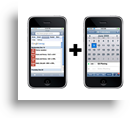
One answer for you home users is to SYNC your Apple device with your GMAIL Calendar and Address Book / Contacts via the new Google Sync Service.
Features
Synchronize your contacts. Get your Google contacts quickly and easily to your phone. With Sync, you can have access to your address book at anytime and place that you need it.
Get calendar alerts. Using your phone’s native calendar, you can now access your Google calendar, and be alerted for upcoming appointments with sound or vibration.
Always in sync. Your contacts stay synchronized whether you access them from your phone or from your computer. Add or edit contact information right on your device or on your Google account on the web.
Before we get into the How-To. Please note the following:
- FIXED! Google Sync via ActiveSync will now sync your Email, Calendar and Contacts as long as your running the latest iPhone and iPod Code! Google Sync via ActiveSync will not Sync your GMAIL Email. Google Sync only Synchronizes your Google Calendar and Contact List / Address Book. At this time, your GMail Inbox will need to be kept in Sync via iMap.
- Fixed again! The latest iPhone OS’s will now support multiple ActiveSync accounts! For those of you who are already syncing your iPhone with your Corporate Email Server via ActiveSync, your outta luck. The iPhone and iPod Touch only allow you to set up 1 ActiveSync connection. You will need to choose between your Corporate Email or Google Services or do like me and just use GMAIL via iMAP on the iPhone.
1. First confirm your iPhone or iPod Touch has the latest firmware. 2.2 or higher is required. You can find your Firmware settings under: Settings > General > About > Version on your device. If you find you need to update your firmware you can do so easily with iTunes.
2. Tap the Settings application icon.

2. Tap Mail, Contacts, Calendars >

3. Tap Add Account… >

4. Tap Microsoft Exchange

5. Enter the required information into the fields on this next page. The
- Email – Be sure to Enter your Full Email Address (ignore the screenshot below… I need to update it)
- Server – You must enter m.google.com however you will only get this option AFTER you enter your username.
- Domain – Leave that blank. This setting is used for corporations ONLY who have their own Exchange Server.
- Username – Must match your Google account information. Although the Google Instructions show a screenshot of “User@googlemail.com”. For 99.999% of us, this will not work since we all use “user@gmail.com”. So, just use your GMAIL account info.
- Password – Yeah… that’s your GMAIL Password
- Description - This can be anything… I usually use my email address
- SSL – On

6. Tap Off or On anything you want to Sync with your GMAIL Account. Click Done.
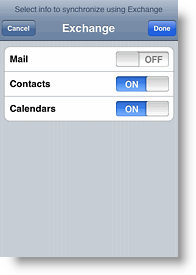
All done!
Now that your device is synched, any changes made on the iPhone/iPod Email, Calendar and/or Contacts Address Book will automatically update your Google Calendar and Contacts Address Book and vice versa (when internet is available to the device of course). VERY GROOVY INDEED!!!
Questions? Comments?
Tags: iphone, ipod-touch, google-sync, gmail, apple, activesync, exchange, email, calendar, contacts, address-book
Related posts:
66 Responses to “How To Sync iPhone, iPod Touch Email Calendar and Contacts with Google”




Thanks for the help, I couldn’t get it to work. I was following the instructions on google but you’re right they did mess up, email@googlemail.com doesn’t work; you have to use gMail. Funny, but then again google is known for having horrible typos.
@maximafan23 – I’m glad the article helped your out!
Thanks a ton for the help! Best explanation out there.
Will this approach keep 2 ipod touches in sync? My wife and I would like to share a single calendar. So we are thinking of using a google calendar and buying 2 ipod touches but aren’t sure if it will work.
@Steve – Yes. There is no limit as long as you have the Credentials (Username and Password) for the Google Account. ENJOY!
I tried to follow the steps. but I don’t have the option of “server” to enter m.google.com. why?
@Diana – Hi Diana. YES, that’s a KNOWN issue. Please read STEP 5 bullet “2″ above. You must FIRST enter in your username BEFORE the Server box will show up…. Sorry if I didn’t make that very clear above.
Great blog found this via twitter im just adding to my blog now.
I have followed all the steps and it keeps throwing up a box that says Password Incorrect. I have gone into gmail and made a new password and that still is not working any ideas? Thanks for your help.
@justin,
I finally cracked ithe “password incorrect” problem
On the wifi settings on the Iphone and on the Ipod touch, there is a Proxy setting, which had defaulted to HTTP. I changed it to “AUTO” and it solved the probelem.
@justin – great find Justin. Thanks for the FYI! I’ll need to update the article to call that out. Thanks again *and welcome to the groovyPost community* !
@MrGroove,
hi i cant find the proxy setting where is it?
i hv the same problem too!
@justin,
Thank you – the problem appears to be fixed now (and I didn’t even have to enlist the help of my techno savvy partner!)
@jenny & @justin – Where is this setting exactly? Can you be more specific? @kwok appears to need help finding it…
Hi, any idea of how to syncronize more than one google calendars? I only get to see the “Personal” one.
Thanks!
Anna
@anna, Yikes…. Last I played with this I seem to remember it’s only possible to SYNC a single Google Calendar with your iPhone and that is the one which is tied to the Google Credentials you enter. You can however SYNC multiple mailboxes however using IMAP to add multiple mailboxes to the iPhone. Sorry Anna…
Hi, I think I have the same problem as Anna. My son has a calendar I can see in my google calendar (shared), but I can’t see these on my iTouch. I’m not really syncing to more than one calendar, just trying to see everything on my iTouch I see on my computer.
Thanks
@Julie,
Yeah… Unfortunately Google has not enabled that type of functionality yet from their service. The iPhone/iTouch allows multiple Mailboxes (via iMap) from GMAIL but only 1 calendar. Sorry.
That being said, WELCOME to the site!
Wow! That was fantastic – thanks so much! It saved a lot of re-typing….
@deb rizzi,
Thank you! That was really easy! Really appreciate this
@GirlBug,
Excellent! Your VERY welcome! Welcome to groovyPost!
Thanks for the post, any thoughts on how to set up an iphone using the corporate exchange server settings?? Do I need administrative access to the exchange server in order to facilitate this option or can I simply be an administrator on the pc with the proper administrative settings?
@Bugsy Towns,
Hi Bugsy and welcome to groovyPost. The install is actually quite simple as long as you know the Address for the existing Outlook Web Access or OWA. For instance, the address at Microsoft is https://owa.microsoft.com.
Just follow the same steps above only instead of entering in the Google address for the mail server, enter in the address for your OWA server on the internet.
Admin rights is not needed on your PC (since it’s not involved) or Exchange since this is all happening on your device. Some companies however do have policies against personal devices connecting to corporate mail systems so you might want to check with your IT guys before you try it out (or risk it!!!).
Thank you, works great and super easy to setup.
@jaie,
Excellent and welcome to groovyPost!
I can’t get past the password. Please help. I’m using Ipod Touch 2nd Gen OS 3.0. I’d like to sync my google calendar.
Hi,
I know what is the problem now, I change my emaill address [abc.123@gmail.com] to [abc123@gmail.com], <= without a dot, and it works now!
@henry,
Excellent! Great info as well. That’s one thing to remember with GMAIL. GMAIL ignores all Periods ( . ) in the email address. This is a tip to remember in the future. Test it out. Send yourself an email to a.b.c.1.2.3@gmail.com and you will get the email. I use this at times to have multiple accounts on a system however still using a single GMAIL account.
Thank you, Thank you, Thank you!!!…Love my iTouch, but I have been having such problems getting things to synch!!
This works great and SOOOO easy to understand!!!
Thanks again!
@Brenda,
Excellent! Thank you for the feedback.
I get it to sync google to Ipod touch but NOTHING goes over to the Google calendar. Any Idea’s what I did wrong?
@Steve Lankheet,
What about the other direction? Do changes made on the google calendar show up on your iPod Touch calendar?
Yes I can add to google calendar and it goes across to ipod touch OS 3
@Steve Lankheet,
If updates are being pulled down from Google then Authentication is working. There must be something else going wrong. Google JUST upgraded the Google SYNC server – http://googlemobile.blogspot.com/2009/09/google-sync-now-with-push-gmail-support.html so you should try to remove the existing SYNC account and re-create it.
BTW – It now supports MAIL as well as Calendar and Contacts so it’s a good time to RESYNC anyway.
Hi there.
Can you please help. I have asked this question of many IT specialists in my area and no-one can give me an easy, straight answer.
I have an iPhone (updated version 3.0).
I have Outlook 2003 on my desktop at the office (large corporate with all the bells and whistles on Exchange Server)
I have Outlook 2007 on my personal laptop/
My work Outlook syncs to my phone and updates automatically.
My personal Outlook on my laptop only sync’s when connected with the cable.
How can I get my laptop to sync automatically?
I would really appreciate your help with this frustrating dilema.
Thanks so much!
Loren
@Lauren,
What email is configured on your personal Laptop? I assume this is your Home email address? Yes/No? Which email provider is it? Yahoo Mail? GMAIL? Hotmail? Verizon Mail? etc…
Also, what is it you want to SYNC? Email/contacts/calendar – all 1 or 2?
Worked like a charm on my iTouch! Great directions!
@Mike,
No problem! Thanks for the feedback!
I can’t make it work! I follow all the instructions here, just like I followed all the instructions on the Google website. I use my @gmail.com address. Everything seems like it works, until I actually go to the calendar on my iPod Touch and there is nothing there! It worked using the program Nueva Sync, but I’d rather not have to use some outside program… I want it to work on its own. Any ideas?
i have other calendars combined with my calendar on google how do i get those to work when people share calendars with me
You can subscribe to calendars via the internet share address on the calendar using your iphone. Do a search here on groovypost for how-to subscribe to an internet calendar.
best how-to guide. thankee. stupid apple is poop for support and gmail’s doesn’t give enough detail for the iPhone/iPod Touch. thank you so much.
@FruHD – Glad you benefited from the guide. Thnx for the feedback.
Thanks ever so much!
Hi
This works great for mail and calendar but does not seem to work as well for contacts.
It has synced my contacts correcly but when I make any changes on my ipod it doesn’t show the changes if I look at my contacts list on my email via computer. Should it work like that?
Thanks
Charli
hello,
sorry if this sounds supid but how do i back up my contacts and calendar on ipod touch. they both have thnigs like bdays, annivereries, emails. I do not want to lose these oviously. can someone help me back up my ipod.
thanks in advance
Jim (sorry for any typos, i am doing this is a rush)
************************
I have windows vista home edition
I have ipod touch 8gb (i think it is 2nd g)
*******************EDIT*****************
I also want to know if there are any other programs to sync calender with ipod touch – i do not have outlook- i am happy to use google but any other programs would be good-
thanks in advance
Jim
This was as helpful as the google.com instructions but the problem I am having is that my contacts still won’t sync from my iPod to gmail, rather they only sync to the iPod. You said the gmail won’t sync, however, using the method described here my gmail syncs but not the contacts (and I don’t need the calendar so I haven’t tried it). Any suggestions?
I have a google calendar account but it is set up using sonic.net email extension
I entered all the information correctly on my new Iphone 4 using the sonic email, but I can not get them to sync.
do I use gmail extension even though I do not use the email service?
I tried this but then when I go to ITunes info and select the calendar to sync it states there are no supported calendars so it doesn’t sync??
ANy help please let me know at Bureaumm@ g mail dot com
I have an Ipod Touch 2G with OS 4. I use to be able to sync my google’s calendar and its stored on the ipod so I can view it anywhere. Now if I don’t have a WIFI connection, the calendar is empty. Everytime I open up the Calendar, it will wait for a WIFI connection to populate information…otherwise its empty. How do I fix this so I can see my info on the calendar even when I dont have WIFI connection?
I followed your instructions, but the incorrect password bubble still pops up. Do you know what’s happening and a way to fix this? Thanks so much.
Is this a GMAIL account or a Google-Apps account that your using? Be sure to use CORRECT email address under the email address field and your google account under the userID ie: jackjohn@gmail.com
Confirm those 2 things. Looks like I need to update the article. I wrote this over a year ago and a few things have changed since then…
Great help with syncing using Exchange Server. However, I also have a partner whom uses the same iTouch and also wants to see their Gmail Calander stuff. You can only set up one exchange server account. I found that you can set up Gmail Calendar on your Itouch with Caldav accounts as well.
http://arstechnica.com/apple/news/2009/07/sharing-calendars-with-google-calendar-ical-and-the-iphone.ars
As of the 3.0 software, the iPhone and iPod touch can also sync in both directions using the CalDAV protocol, as well as subscribe to published .ics feeds. To set up CalDAV syncing, go into the Settings, and select “Mail, Contacts, Calendars.” From there, add an account and choose “other” and add a CalDAV account. Then, select http://www.google.com as the server, and provide your Gmail e-mail address as your username and your password.
NOTE. It is http://www.google.com NOT m.google.com
You can add as many caldav accounts as you like
Thanks again for your help..
Really appreciate it.
Hi Ryan,
Thanks for the links and info. BTW – As of IOS 4.x, you can add multiple Exchange Activesync connections. I have 3 on mine currently. That of course assumes you have 4.x running which many complain is WAY to slow on the original iPhone 3.x / iPod Touch.
It appears that only contacts that are in the main “My Contacts” group will be synced. If you have a contact stored in another group such as “Friends” but not “My Contacts” it will not sync.
This worked perfectly for me, EXCEPT it did cause duplications in many of my addresses on my itouch. I tried to clean up the duplicate address by deleting one of them (two identical addresses within one contact on my itouch – all was ok on my desktop) but the result was a deletion of both addresses, thus I lost mailing addresses for many of my contacts. Also, contacts within some desktop contact lists don’t show on my itouch contacts, but when I search for them within global exchange server I can find them. Weird.
Worked flawlessly, thank you soooo much.
After this process I was asked by my iPhone what to do with the contacts already on the iphone. Since they’re duplicates of what I have on Gmail, I decided to delete them.
Love this cloud integration. Only downside is that iphone and google seems to differ about various fields (like IM and addresses).
Still cool though (y)
I have an iTouch (version 4.2.1) and there is no option for choosing “Use SSL”. The information will not synch with the Gmail calendar.
my iPod touch doesn’t let me send emails because it says that my username or password is incorrect but I know that it’s right
Hi there,
I have a gmail account and I use the online calendar all the time as I have a friend abroad who needs to check it as well form our business.
I managed to sync the calendar really easily with my iPad by using the exchange email set up and then setting up the iPad to sync and my iPhone.
However, Im now trying to add my gmail account to my “mail” on my iMac and when I try and set it up it asks for my “outlook web access server”.
I don’t know what to put in this box as I was not asked this when I set it up on my iPad.
In the “incoming mail server” I have put ” m.google.com”
I hope this makes some sense?
Thanks so much,
Dorrie
Thanks so much for your help – I spent all evening trying to syn my contacts and calendar after purchasing a new computer…looking for a free setup until I can get new software. This finally did it! Appreciate your help!
this was very easy and fast i wish i woulda found this site sooner i searched the web for hours and nothing was giving me answers!! thanks!! ) four thumbs up!!!!!
Does this BACK UP old calendar entries? I want to back up my whole calendar- all of my events since 2008. Does this do that? Thanks!!
Unfortunately, I don’t think Google Calendar will sync items older than 1-month. This is mostly because of the Exchange system limitations. You can however sync up your phone to Outlook, iCal, or Thunderbird and then export the data into Google Calendar from there.
Hi all,
I just found a solution to adding/showing multiple calendars from your Google Calendar account (tested on iOS 4.3.2 on an iPod Touch 3rd generation)!
I thought I’d share this with you all, since I couldn’t find a solution for this in the comments.
I added my Gmail mail as a Microsoft Exchange account (see the comments above), so I now have Push-capabilities. If you add Gmail through the Gmail option, ironically and unfortunately you won’t have Push-capabilities, which means you have to manually check for new e-mails… So add your Gmail (Mail + Contacts) through Microsoft Exchange, and disable Calendars in the account sync options.
Then, add your Google Calendar calendars with Settings > Mail, Contacts, Calendars > Add Account… > choose Gmail
Enter your data and choose to sync Calendars only, so disable Mail and Contacts.
By now you will see only one calendar (your primary calendar).
Now, to enable more calendars: go to https://www.google.com/calendar/iphoneselect , log-in to your Google account and choose which calendars you want to show on your iPhone/iPod Touch.
Good luck!